Juniper Tree: A Playful Handwritten Script Font for Editorial Design
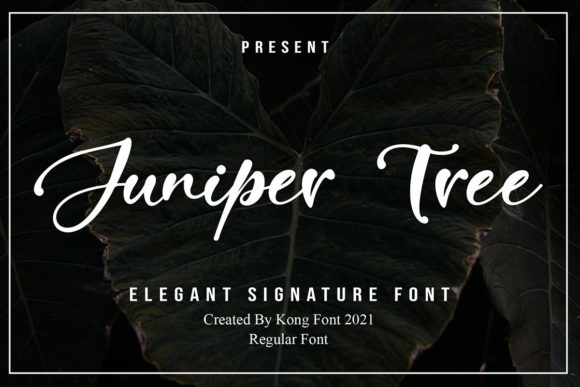
Juniper Tree is a modern and playful handwritten script font that brings warmth, personality, and visual rhythm to editorial projects—especially where authenticity and approachability matter most. As one of the standout Freebies in today’s curated Fonts landscape, it’s not just decorative; it’s functional typography built for creators who design blogs, digital magazines, printable workbooks, and branded newsletters. Its relaxed letterforms, subtle bounce, and natural flow make Juniper Tree ideal for moments where tone matters as much as text.
Juniper Tree for Blog Headers and Article Titles
When readers land on your blog post, the headline sets the emotional temperature—and Juniper Tree excels here. Unlike rigid display fonts, its organic curves and slight irregularity signal human voice and intention. Use Juniper Tree for primary article titles in lifestyle, wellness, or creative entrepreneurship blogs. It pairs cleanly with a neutral serif (like Merriweather) or a light sans serif (like Inter or Lato) for body copy—creating contrast without competing. Because Juniper Tree is optimized for tools like Photoshop and Silhouette Design Studio, you can easily export crisp PNGs for web headers or vector-ready SVGs for responsive layouts. Just avoid using it for long paragraphs: it’s a script font, best reserved for short, high-impact text.
Juniper Tree for Ebook Covers and Chapter Openers
For ebook creators—especially those publishing recipe collections, coaching guides, or seasonal planners—Juniper Tree adds instant charm to cover typography. Its playfulness makes it perfect for titles that lean into warmth, nostalgia, or handmade aesthetics. Try setting “Spring Recipes” or “Your First 90 Days” in Juniper Tree over a soft watercolor background, then pair with a clean, readable serif for subtitle and author name. Inside the ebook, use Juniper Tree sparingly: for chapter openers, section dividers, or pull quotes that reinforce voice and pacing. Since it’s compatible with Photoshop, you can layer textures, adjust tracking for rhythm, and fine-tune kerning between letters like “A” and “W” to ensure balance at larger sizes.
Juniper Tree for Newsletter Graphics and Quote Layouts
Newsletters thrive on visual breaks—and Juniper Tree delivers them elegantly. Whether you’re designing a lead magnet, a weekly reflection prompt, or a subscriber-exclusive worksheet, this handwritten font helps highlight key ideas without shouting. Drop a single line—“You’ve got this”—in Juniper Tree over a muted pastel block, and suddenly your email feels more personal, less algorithmic. It works especially well for quote graphics shared across Instagram or Pinterest, where legibility at small scale matters. Test it at 36–48pt in Photoshop for screen clarity, and always preview on mobile before sending. Remember: because Juniper Tree is part of the Freebies category, it’s accessible—but verify licensing if you plan to include it in paid newsletter templates or client-facing digital products.
Juniper Tree for Printable Planners and Creative Workbooks
Crafters and independent course creators rely on Fonts that feel tactile—even digitally. Juniper Tree bridges that gap: its uneven baseline and gentle slant mimic ink-on-paper authenticity, making it a natural fit for printable planners, habit trackers, and guided journal pages. In Silhouette Design Studio, you can convert Juniper Tree to outlines for precise cutting files—or use it directly for layered PDF printables. For best results, apply it to headings, affirmations, and decorative borders—not dense instructions or checkboxes. Combine with a highly legible sans serif (like Open Sans) for any supporting text to maintain hierarchy and usability. And because it’s designed for both digital and craft workflows, Juniper Tree supports cross-platform consistency—from your Canva social post to your Etsy printable bundle.
Juniper Tree for Wedding Invitations and Elegant Branding
Though rooted in playfulness, Juniper Tree carries quiet sophistication—ideal for wedding-related content like invitation suites, ceremony programs, or bridal guides. Its fluid connections and soft terminals lend themselves to romance without cliché. When used thoughtfully—paired with a refined serif like Playfair Display or a delicate thin sans—it creates contrast that feels intentional, not chaotic. For editorial designers building a cohesive brand identity around weddings or celebrations, Juniper Tree becomes part of a typographic system: expressive for names and dates, restrained for details. Just confirm multilingual support if you're designing for bilingual audiences—many script font Freebies include basic Latin characters but omit extended diacritics.
Juniper Tree for Digital Magazine Covers and Section Headings
Digital magazines need typography that commands attention while reflecting editorial voice—and Juniper Tree answers that call for niche publications focused on creativity, slow living, or maker culture. On a magazine cover, set the title in Juniper Tree at 72–90pt with generous letter-spacing, then anchor it with a bold, geometric sans for issue number and date. Inside, reserve Juniper Tree for section headers (“Letters,” “Field Notes,” “Maker Spotlight”) to create visual rhythm and thematic breathing room. Its compatibility with Photoshop means you can apply subtle drop shadows or texture overlays to enhance depth—without sacrificing readability on retina displays. As with all display font choices, test how Juniper Tree renders in exported PDFs and EPUBs: some script fonts lose fidelity in certain e-reader engines unless embedded properly.
Juniper Tree for Content Branding and Visual Consistency
Your publication’s typography is part of its voice—and Juniper Tree helps define that voice when consistency matters. Use it across touchpoints: as the logo treatment for your Substack banner, the accent type in your Notion template, or the signature style in your Canva brand kit. Because it’s a modern handwritten script font, it signals approachability and craft—qualities readers associate with trusted, human-centered content. To build recognition, limit Juniper Tree to three consistent uses: cover titles, pull quotes, and branded accents (like “Subscribe” buttons or footer signatures). Pair it with a versatile serif for long-form reading and a clean sans for captions and navigation. And before scaling it into commercial templates or client deliverables, double-check whether the Freebies license permits redistribution—it often allows personal and editorial use, but not resale of font files within bundled Fonts.